Templates · Google Sheets
Influencer marketing spreadsheet templates that fill themselves
One Google Sheet with four tabs (Scouting, Outreach, Deliverables, Report) and the exact column headers the Zaver add-on writes, so the numbers arrive by menu action or schedule instead of copy-paste. Yellow cells are yours; the rest fill themselves. Take a copy, or download any tab as a CSV.
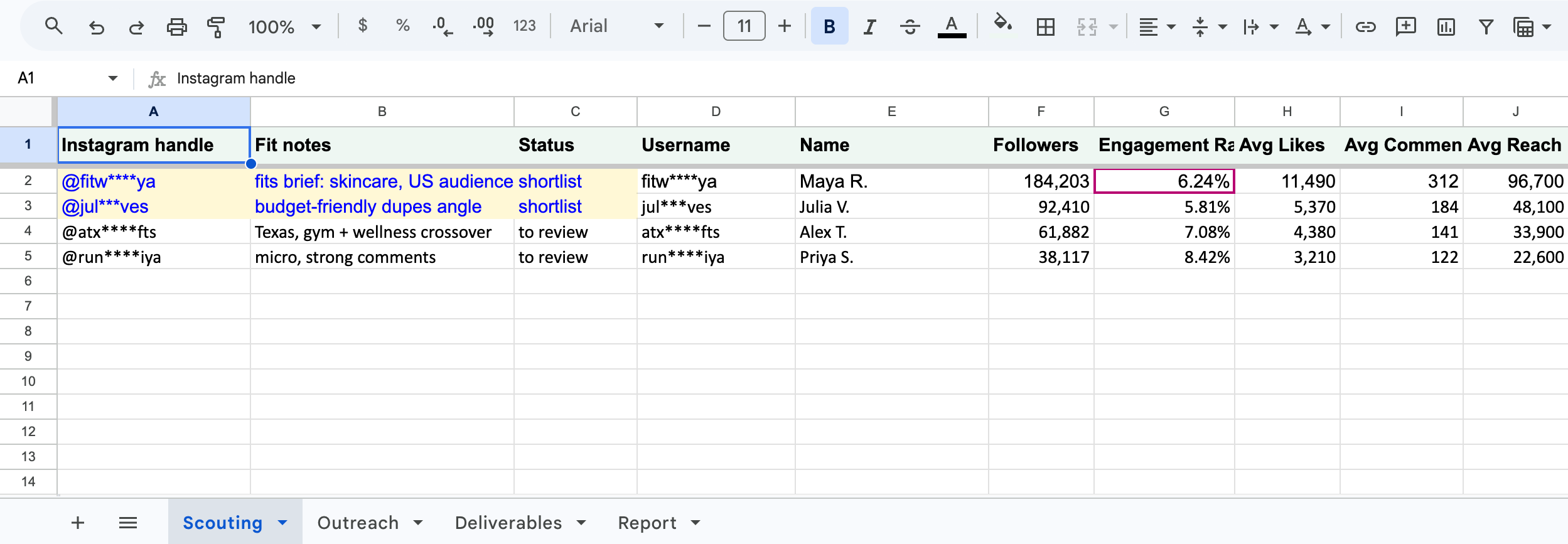
Scouting sheet
One row per candidate. Paste handles in column A; the remaining columns are the exact headers the add-on writes (Username, Name, Followers, Engagement Rate, Avg Likes, Avg Comments, Avg Reach, Bio), so Analyze selected profiles fills them and re-runs refresh in place.
Fill it: Select column A → Extensions → Zaver.one → Profile Analytics → Analyze selected profiles (all metrics).
Download this tab as CSVPlaybook: Audit an inherited creator list
Outreach log
Handle, Name, Email, Status, Next action, Next action date, Last outreach, Template used, Notes. The Email column is what Email Outreach merges from; Status and Next action are the two columns a CRM would add.
Fill it: Select rows → Extensions → Zaver.one → Email Outreach → Send Personalized Emails. Sends log to an Email Reports tab; copy the date into Last outreach or reference the log with a lookup.
Download this tab as CSVPlaybook: Turn your scouting sheet into a live tracker
Deliverables tracker
One row per agreed post: Creator, Agreed deliverable, Link, Due date, Spend, Promo code, then the seven columns Post Analytics writes (Posted By, Type, Likes, Comments, Plays, Views, Caption). An empty metrics row is a deliverable not yet live.
Fill it: Select the Link column → Extensions → Zaver.one → Post Analytics → Analyze selected posts. For a daily refresh, schedule Post metrics → Google Sheet in Radar on this tab.
Download this tab as CSVPlaybook: Automate campaign reporting in Google Sheets
Report tab
Per creator: Spend, Views, Likes, Comments, Cost per view, Cost per engagement, Reach vs usual, Code revenue, ROAS, with the formulas already in place and a Total row. Point the Views, Likes and Comments cells at the Deliverables tab or paste them in.
Fill it: Import the CSV as a tab, then replace the sample rows with references to your Deliverables tab. Revenue by promo code comes from your store today; a Shopify integration for revenue attribution is coming soon.
Download this tab as CSVPlaybook: Report influencer ROI to leadership
Set up once
- 1
Install the add-on
Google Workspace Marketplace → Zaver.one. Then Extensions → Zaver.one → Activation Settings → paste a Radar API key from Settings → Developer → Connect.
- 2
Copy the sheet
Make a copy in Google Sheets (button above). The four tabs, formulas and how-to notes come with it. If you work in Excel or Numbers, download the tabs as CSV instead.
- 3
Fill and schedule
Run the menu actions on each tab. For daily or weekly refreshes, connect the spreadsheet in Radar → Google Sheets and schedule Profile metrics and Post metrics → Google Sheet.
The menu path with illustrations is on the campaign tracker playbook.
Questions
How do I get the template into my Google Drive?
Click "Make a copy in Google Sheets". Google opens a copy dialog; confirm it and the four tabs (Scouting, Outreach, Deliverables, Report) land in your Drive with the formulas, the yellow input cells and the how-to notes intact. Nothing is shared back with Zaver.
Can I still use the CSV versions?
Yes. Each tab is also downloadable as a CSV for Excel, Numbers or Airtable: File → Import → Upload → "Insert new sheet(s)" in Google Sheets. Formulas in the Report template import as formulas.
Do the templates need the Zaver add-on?
They work as plain spreadsheets. The add-on is what fills the metric columns automatically; install it from the Google Workspace Marketplace and connect it with a Radar API key.
Will re-running the add-on add duplicate columns?
No. The templates use the exact header names the add-on looks for, so re-runs refresh the existing columns.
Can I combine all four in one spreadsheet?
Yes, and you should: one spreadsheet with four tabs is the self-filling campaign tracker described in the playbooks.