Playbook · Google Sheets · 60 min
Audit an inherited creator list in an afternoon
Anyone who just took over a campaign, an agency account or a two-year-old "influencers" tab.
Put the handles in one column. Run Extract Usernames to normalise links into handles, then Analyze selected profiles to refresh followers, engagement rate, average likes, comments, reach and bio for every row; "Profile not found" lands in the cell for dead accounts. Sort by engagement rate against size, flag anything with a tiny engagement rate for its tier, and run insight reports on the survivors you plan to pay, which adds authenticity, audience and a fair price. A 300-row list takes two add-on runs and about an hour.
You need
- The old list, handles or profile links in one column
- The Zaver.one add-on connected
Step by step in Zaver
- 1
Normalise the column
Select the column. Extensions → Zaver.one → Profile Analytics → Extract Usernames turns links and @handles into clean usernames, free.
- 2
Refresh everything
Select the usernames. Profile Analytics → Analyze selected profiles (all metrics). Google stops a run at about five minutes; select the remaining rows and run again.
- 3
Drop the dead
Filter the Followers column for "Profile not found" and cells with errors. Those accounts are gone or private.
- 4
Flag the hollow
Add a column: engagement rate versus a tier rule of thumb (under 1% on an account below 100K is a flag). Sort by it.
- 5
Vet the keepers
For the top 20 to 30 you would actually pay, run insight reports in Radar: authenticity, audience, past brand deals and fair price. Bulk report by email takes 10 handles at a time.
- 6
Save the clean list
Copy the survivors to a fresh Scouting tab and schedule a weekly profile refresh so it never rots again.
Or ask it in ChatGPT or Claude
With Zaver connected as an MCP server, the whole job is one message. Your assistant calls run_data_tool behind the scenes.
here are 300 handles: refresh followers and engagement, flag any that are gone or have under 1% engagement below 100k followers, then run insight reports on the best 20Your assistant can chain run_data_tool for the refresh with get_creator_insights for the shortlist.
Not connected yet? Set it up in about a minute.
Where it is in Google Sheets
The menu path, step by step. Labels match the Zaver.one add-on.
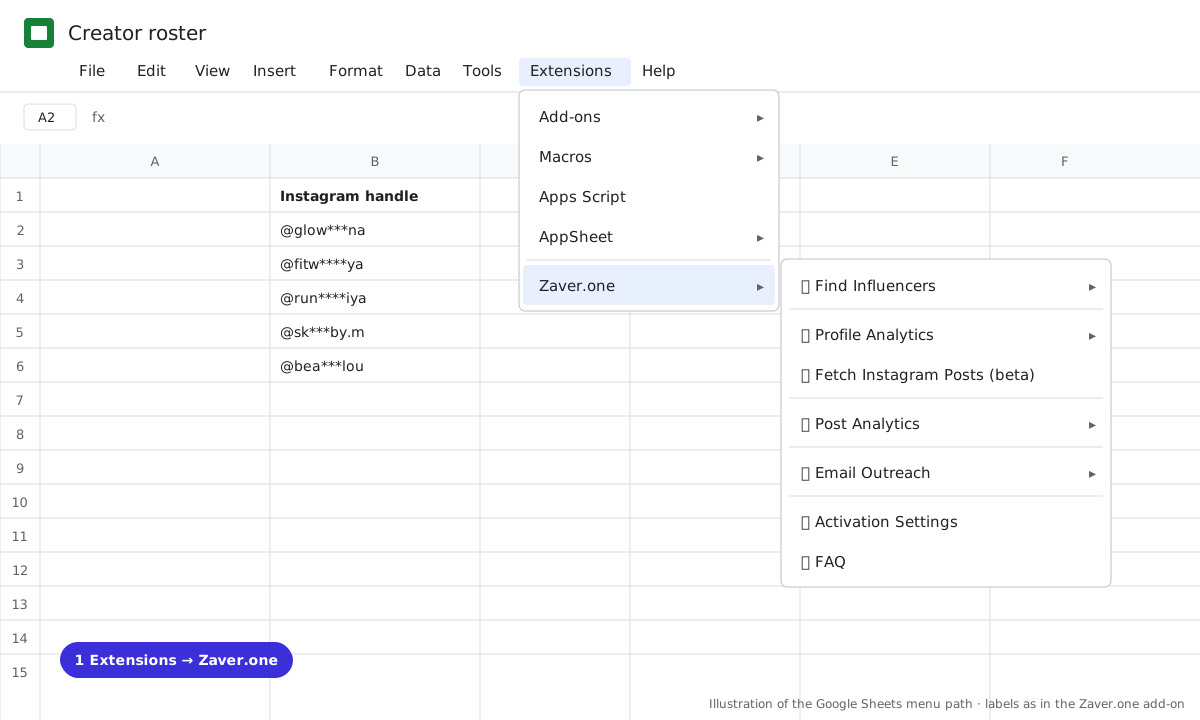
1 Extensions → Zaver.one. Every add-on action starts here. 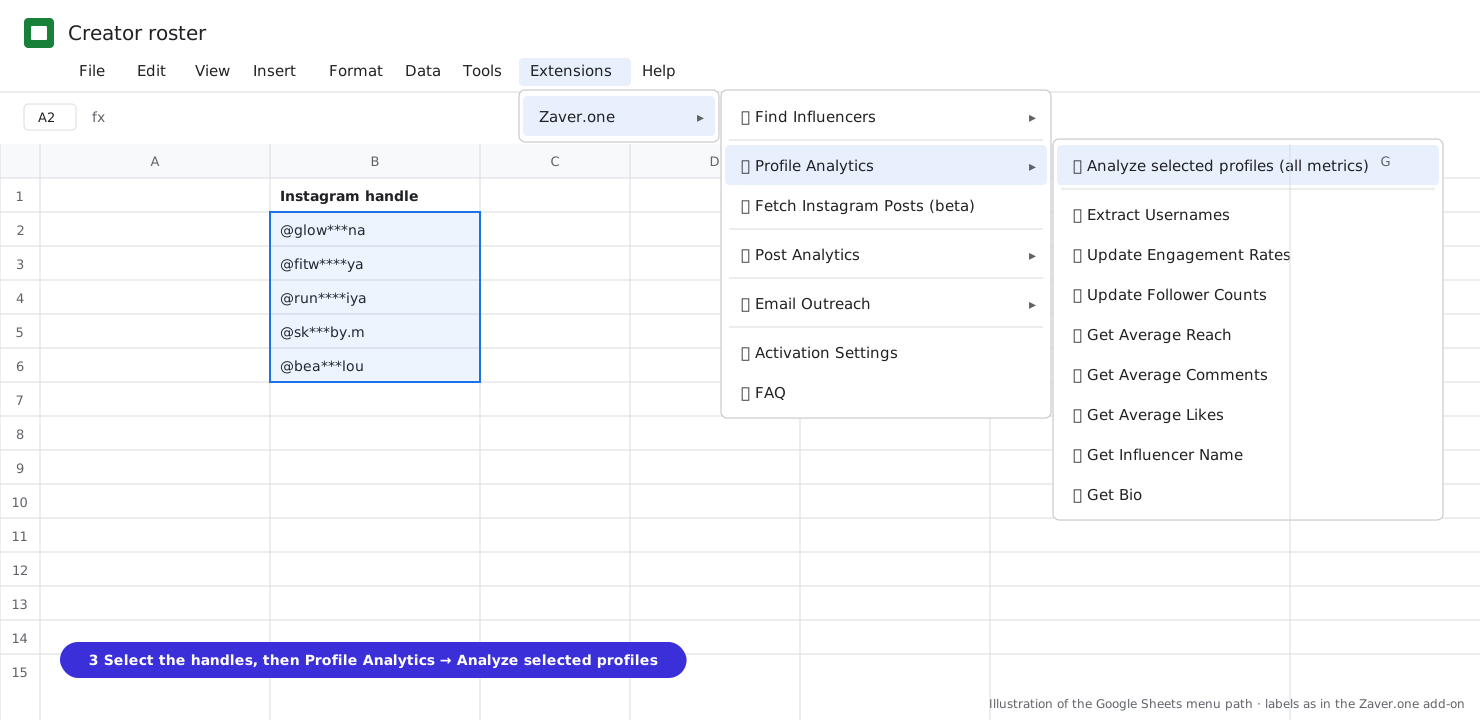
2 Select the handles, then Profile Analytics → Analyze selected profiles (all metrics). 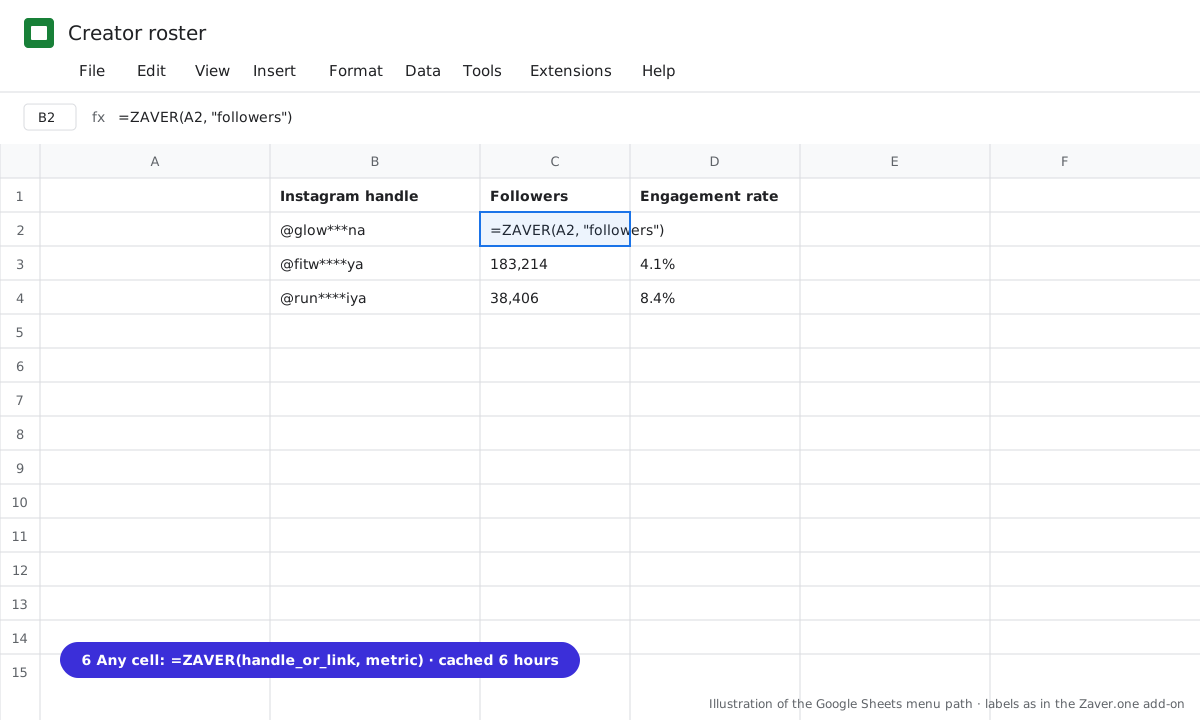
3 Any cell: =ZAVER(handle or link, metric).
What you get
Input: 300 inherited handles · Extract Usernames · Analyze selected profiles
| Handle | Followers | Eng. rate | Flag | Action |
|---|---|---|---|---|
| @glow***na | 61.0K | 6.2% | keep → insight report | |
| @old***brand | Profile not found | gone | drop | |
| @big***fit | 420K | 0.3% | hollow | drop |
| @sk***by.m | 9.0K | 8.4% | keep → seeding |
Illustrative sample. Handles are masked; numbers show the shape of a real result, not a specific account.
Cost
Per profile lookup on your plan (cached 6 hours); Extract Usernames is free. Insight reports 10 credits on Starter, 8 on Growth and Scale.
Limits
- About 5 minutes per add-on run
Questions
How many rows per run?
As many as fit in about five minutes, at one to four seconds per row. Select the rest and run again; matching headers are reused.
Can I do this without the add-on?
Yes. Connect the sheet to Radar and run Profile metrics → Google Sheet once on the handle column.
Related playbooks
Turn your influencer scouting sheet into a live trackerKeep a creator roster alive with no manual workSpot fake followers before you pay a creatorGoogle Sheets add-onAll playbooks