Playbook · Google Sheets · 15 min
Turn your influencer scouting sheet into a live tracker
Teams whose influencer scouting already lives in Google Sheets and who do not want to move to another tool.
Keep the sheet. Zaver works inside it in three ways. The add-on fills profile metrics (followers, engagement rate, average likes, comments, reach, bio) next to any column of handles and post metrics next to any column of deliverable links. Radar's Sheets tools do the same on a schedule, so the numbers refresh every morning or every week without anyone pasting. And outreach sent from the sheet through the add-on is logged to an Email Reports tab with recipient, subject, date and status, so who was contacted and when is in the same file as the scouting data. It is not a CRM; replies stay in Gmail. For most teams that is enough to stop the two problems: stale numbers and untracked conversations.
You need
- Your existing Google Sheet with handles, and optionally deliverable links
- The Zaver add-on from the Workspace Marketplace
- A Radar API key for the add-on (Settings → Developer)
Step by step in Zaver
- 1
Install and connect the add-on
Google Workspace Marketplace → Zaver.one. In the sheet, Extensions → Zaver.one → Activation Settings → paste a Radar API key → Connect. One key per sheet or team.
- 2
Fill performance next to the handles
Select the column of usernames or profile links. Extensions → Zaver.one → Profile Analytics → Analyze selected profiles. Eight columns land beside it: Username, Name, Followers, Engagement Rate, Avg Likes, Avg Comments, Avg Reach, Bio. A header row is detected and skipped.
- 3
Make it refresh itself
Re-running on the same rows reuses the same columns. For hands-off refreshes, connect the sheet in Radar and schedule Profile metrics → Google Sheet weekly (append for history) and Post metrics → Google Sheet daily for the deliverables tab.
- 4
Track the deliverables
Paste each creator's live post or reel link in a Deliverables tab. Post Analytics in the add-on, or the scheduled Radar tool, writes Posted By, Type, Likes, Comments, Plays and Views beside each link. An empty row is a deliverable not yet posted.
- 5
Log outreach from the same sheet
Add an Email column. Select rows, Extensions → Zaver.one → Email Outreach → Send Personalized Emails, pick a template or write your own with {{Column Header}} merge fields, send from your own Gmail. Each send is logged to an Email Reports tab with email, name, subject, date and status.
- 6
Add the two columns a CRM would
Next to the log, keep Status (contacted, replied, negotiating, booked, declined) and Next action with a date. Conditional formatting on the date turns stale threads red. That plus the log is the communication record.
Or ask it in ChatGPT or Claude
With Zaver connected as an MCP server, the whole job is one message. Your assistant calls run_data_tool behind the scenes.
refresh followers and engagement for every handle in my Scouting sheet each Monday, and post metrics for the Deliverables tab every morningNot connected yet? Set it up in about a minute.
In Google Sheets
Any single cell can pull a live number too: =ZAVER("handle", "followers") or =ZAVER("<post link>", "views"). Lookups are cached for 6 hours so recalculation is free.
=ZAVER("glow***na", "engagement_rate")Where it is in Google Sheets
The menu path, step by step. Labels match the Zaver.one add-on.
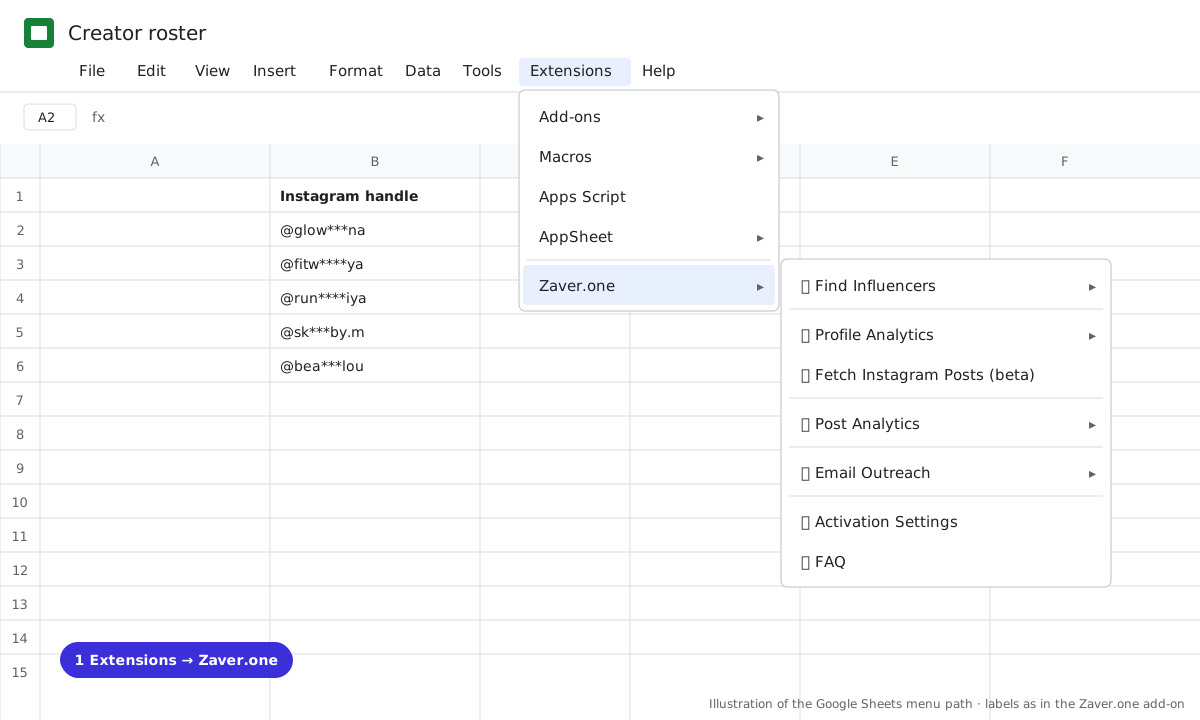
1 Extensions → Zaver.one. Every action starts here. 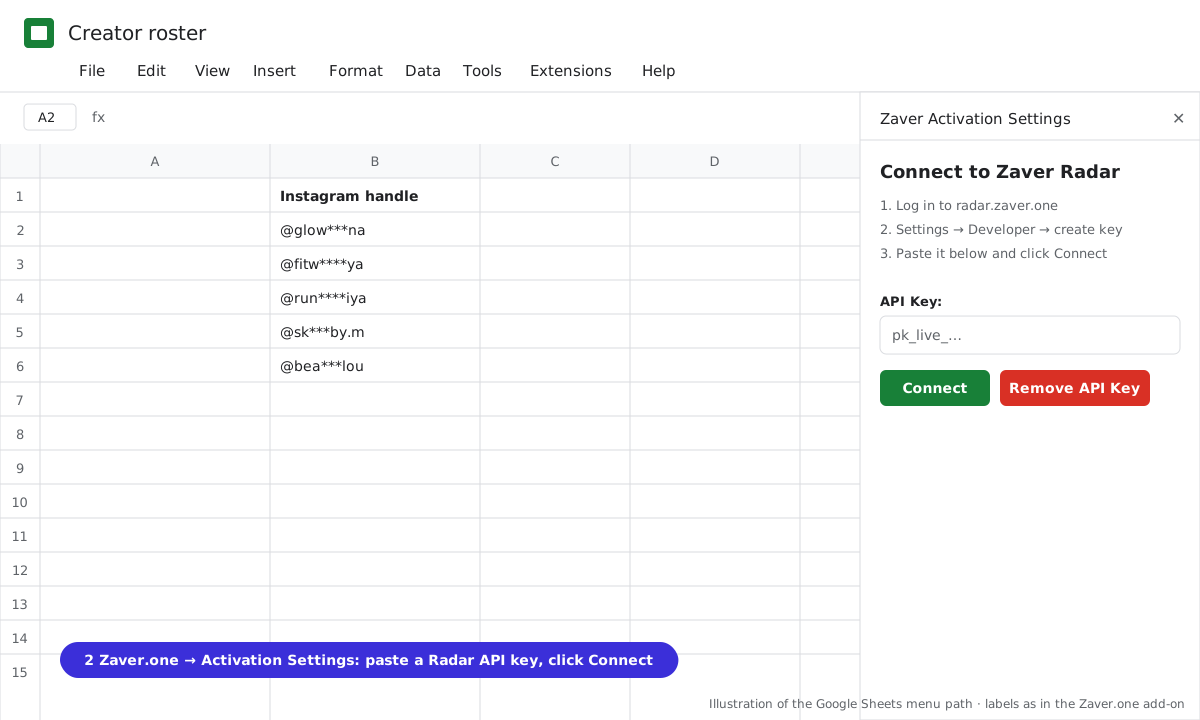
2 Zaver.one → Activation Settings: paste a Radar API key, click Connect. 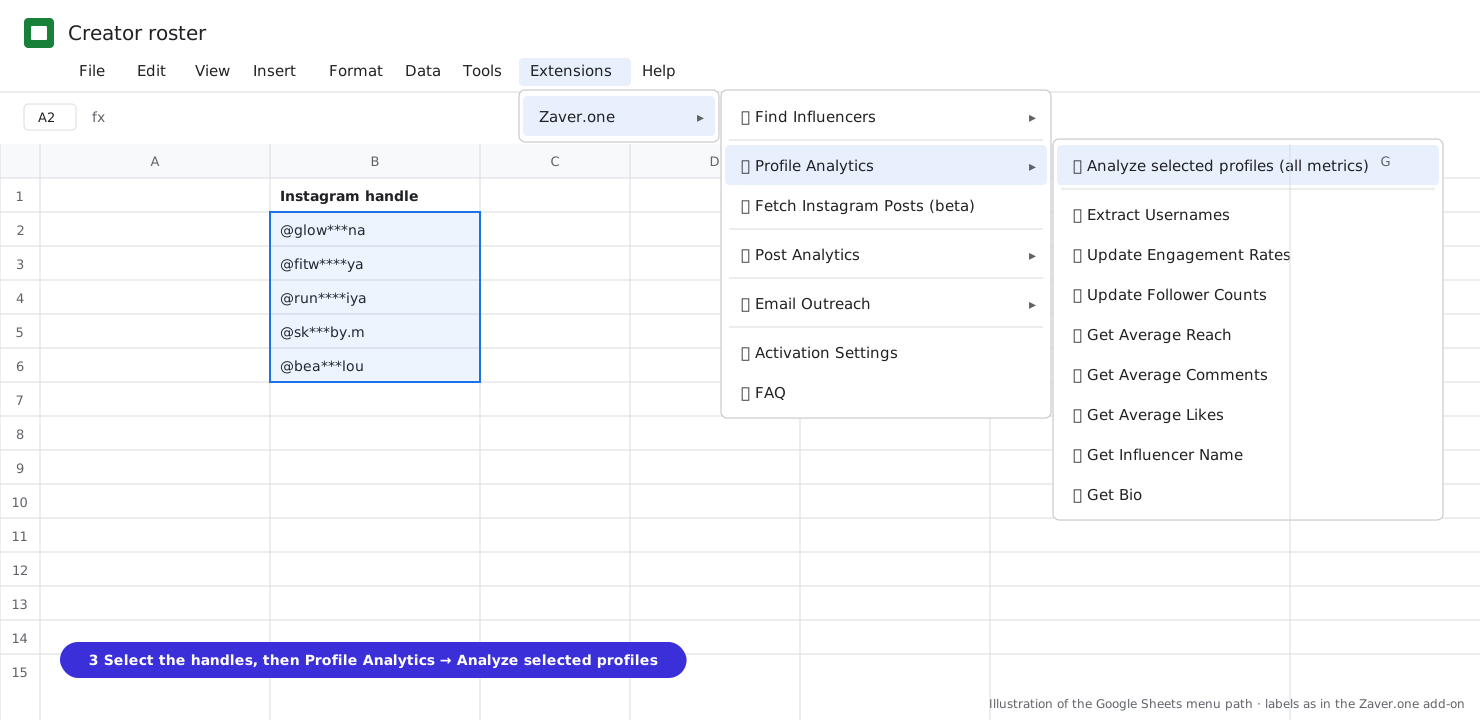
3 Select the handles, then Profile Analytics → Analyze selected profiles (all metrics). 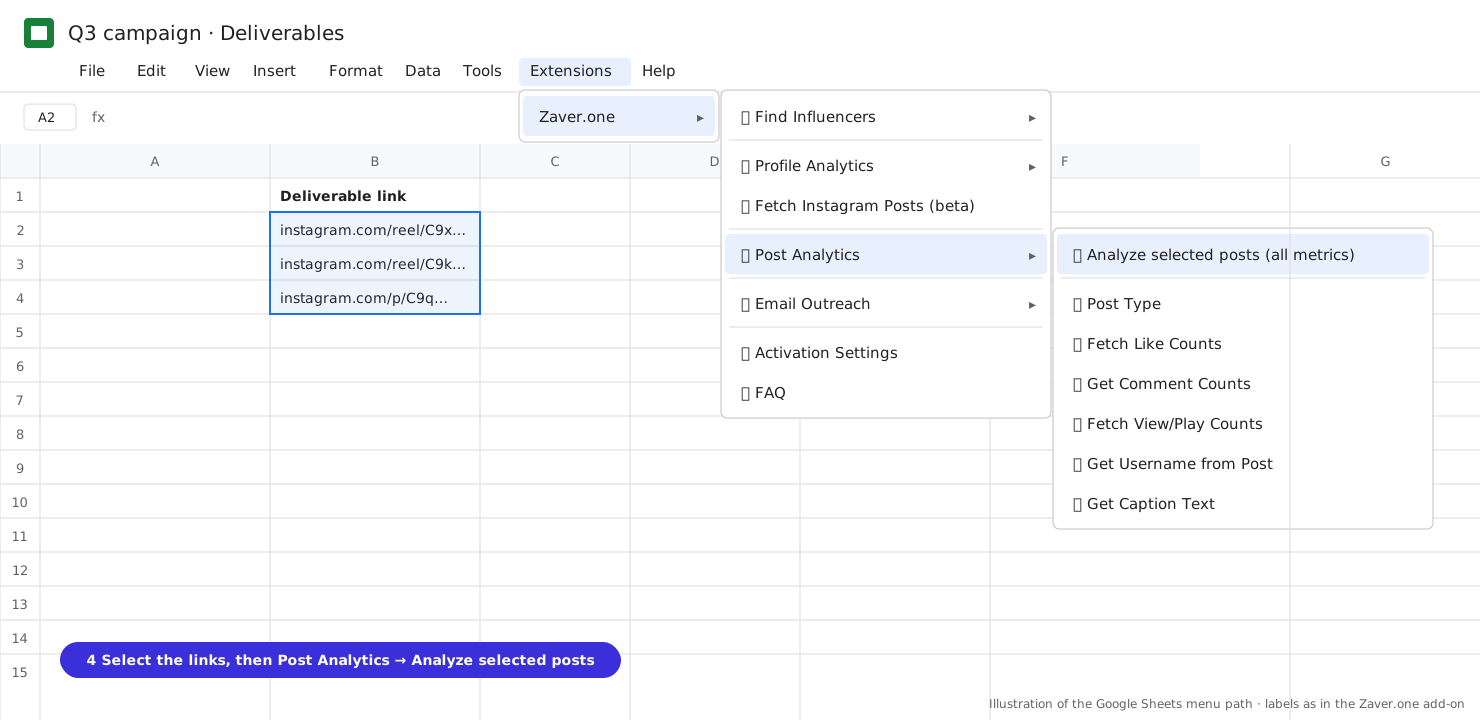
4 Select the post links, then Post Analytics → Analyze selected posts (all metrics). 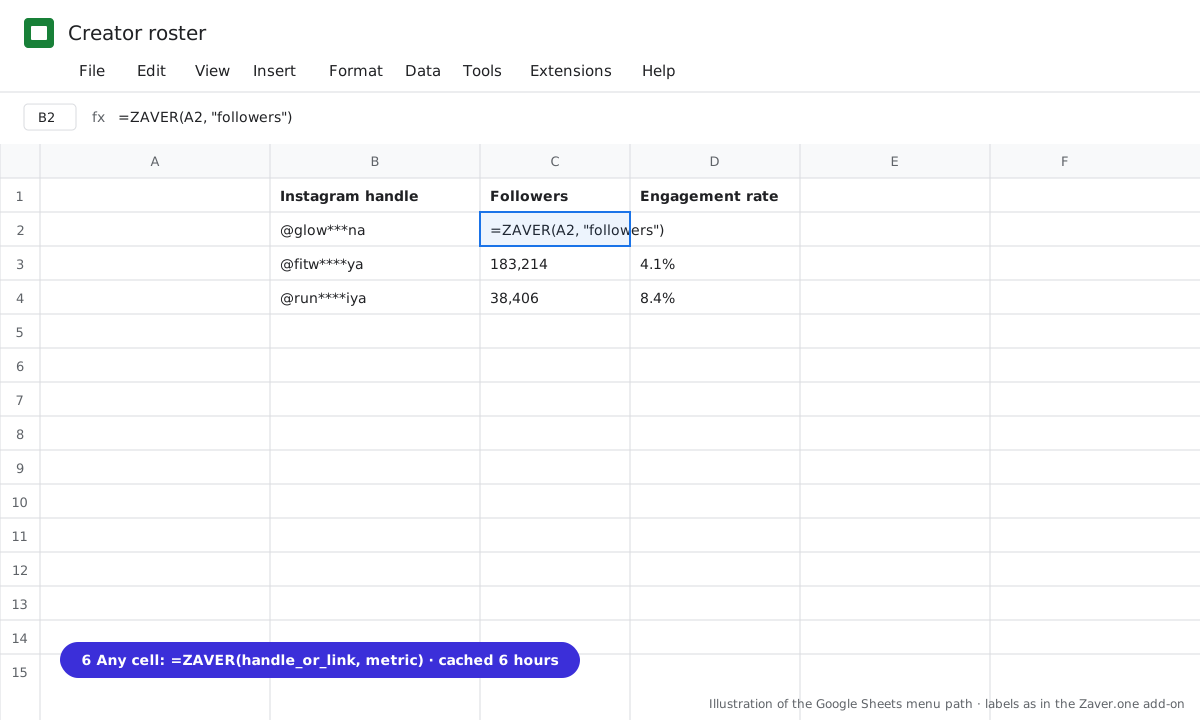
5 Any cell: =ZAVER(handle or link, metric).
What you get
Input: Scouting tab · 120 handles · weekly refresh · Email Reports log
| Creator | Followers | Eng. rate | Avg reach | Last outreach | Status | Next action |
|---|---|---|---|---|---|---|
| @glow***na | 61.0K | 6.2% | 38K | 14 Oct · Sponsored Content Request · sent | negotiating | send rate card · 18 Oct |
| @fitw****ya | 183K | 4.1% | 92K | 9 Oct · First Follow-Up · sent | replied | call · 16 Oct |
| @sk***by.m | 9.0K | 8.4% | 7K | to contact | send Product Sampling · 17 Oct |
The first four columns refresh themselves. The last three are the communication record: the log fills "Last outreach", you keep Status and Next action.
Illustrative sample. Handles are masked; numbers show the shape of a real result, not a specific account.
Cost
Profile lookups and post lookups are charged per row on your plan and cached 6 hours. Scheduled refreshes: 250 credits per 1,000 profiles, 150 per 1,000 posts; scheduling free on Growth and Scale. Emails send from your Gmail within Google's daily quota.
Limits
- Google's script limit is about 5 minutes per add-on run; select the remaining rows and run again
- Email Outreach logs sends; it does not track opens, clicks or replies
- Bulk post analytics is Instagram; YouTube and X links take single-metric items
Questions
Do we have to move our data into Zaver?
No. The sheet stays the system of record. Zaver writes into it and reads from it.
Does it track replies from creators?
Not automatically. Sends are logged with date and status; replies arrive in your Gmail. A Status and Next action column beside the log is the practical fix, and it lives in the same sheet.
Can several people work on the same sheet?
Yes. One API key per sheet or team; every lookup is logged in the Radar audit log against the key.
What if a creator's numbers look wrong?
Per-row problems such as "Profile not found" are written into the cell and the run continues. Run an insight report in Radar for the full picture on any single creator.
Related playbooks
Automate influencer campaign reporting in Google SheetsTrack creator follower growth weeklyFind influencers inside Google SheetsGoogle Sheets add-onAll playbooks