Playbook · Reporting · 10 min
Automate influencer campaign reporting in Google Sheets
Agencies and brands tracking deliverables without chasing creators for screenshots.
Keep one tab with the deliverable URLs. Connect the sheet to Zaver once, point the Post metrics → Google Sheet tool at the URL column, choose the metrics and an output column, and schedule it daily. Zaver fetches current views, likes, comments, shares, posted date and author for each Instagram, YouTube, Facebook or X post and writes them in batches, logging any problem in a notes column. The tracker is current every morning. It costs 0.15 credits per post refresh.
You need
- A Google Sheet with the deliverable URLs in one column
- Growth or Scale plan for scheduling
Step by step in Zaver
- 1
Connect the sheet
In Radar, Google Sheets → connect, and share the sheet with the Radar service account once.
- 2
Point the tool at the column
Tools → Post metrics → Google Sheet: tab, URL column, row range, output column, metrics, overwrite or append, optional notes column.
- 3
Schedule daily
Daily at the time your team starts. You get an email when each run completes.
- 4
Build the report on top
Totals, cost per view and per engagement, and creator-level rollups are plain formulas over the refreshed columns.
Or ask it in ChatGPT or Claude
With Zaver connected as an MCP server, the whole job is one message. Your assistant calls run_data_tool behind the scenes.
refresh the post metrics in my campaign sheet, tab Deliverables, URLs in column B, every morning at 8Not connected yet? Set it up in about a minute.
In Google Sheets
Inside the sheet, Extensions → Zaver.one → Post Analytics fills Posted By, Type, Likes, Comments, Plays, Views and Caption for selected Instagram links on demand; the Radar tool is the scheduled route.
Where it is in Google Sheets
The menu path, step by step. Labels match the Zaver.one add-on.
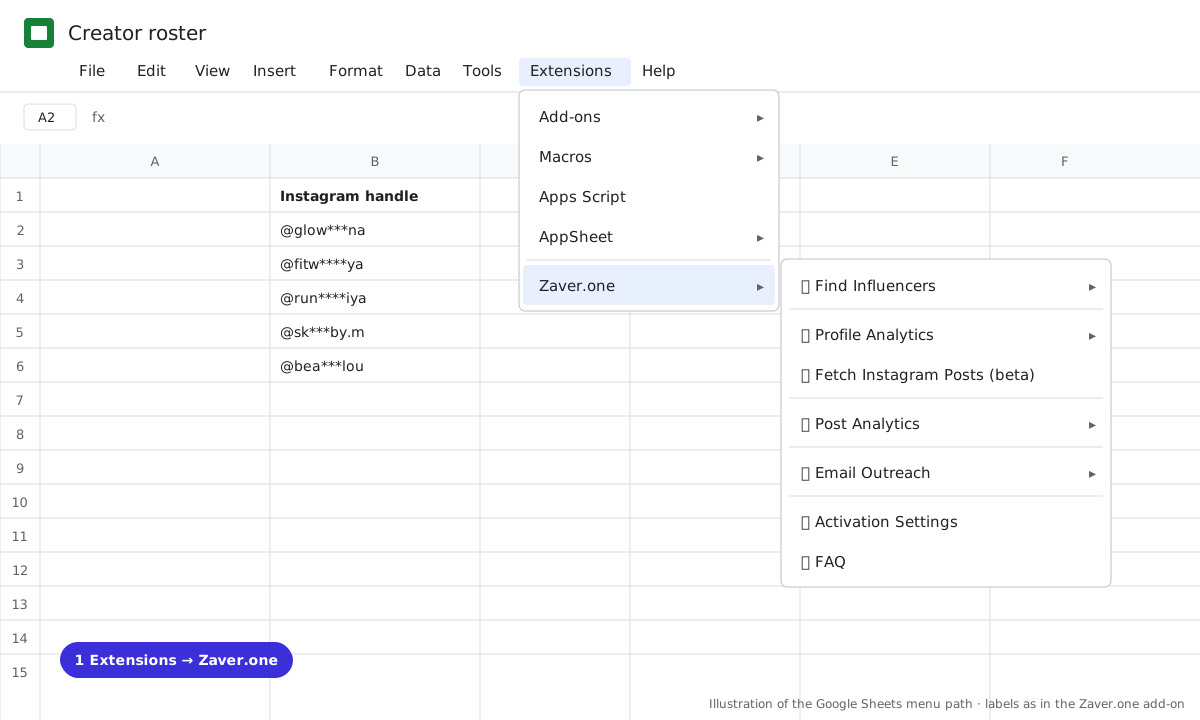
1 Extensions → Zaver.one. Every action starts here. 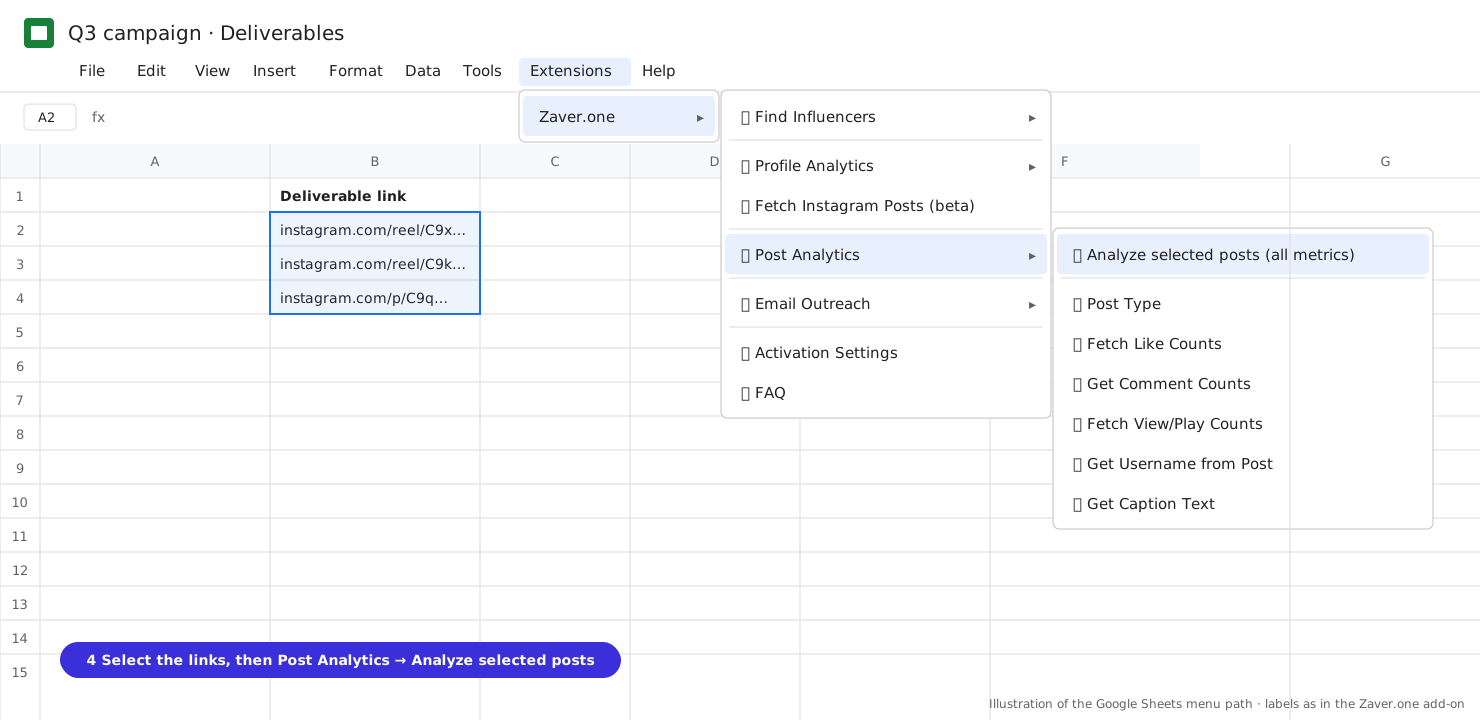
2 Select the post links, then Post Analytics → Analyze selected posts (all metrics).
What you get
Input: Deliverables tab · 24 URLs · daily 08:00
| Creator | Post | Views | Likes | Comments | Posted | Note |
|---|---|---|---|---|---|---|
| @glow***na | reel | 112K | 9.8K | 640 | 3 Nov | |
| @fitw****ya | reel | 84K | 6.1K | 410 | 4 Nov | |
| @run****iya | post | not posted yet |
An empty row with a note is a deliverable that has not gone live. That is the row to chase.
Illustrative sample. Handles are masked; numbers show the shape of a real result, not a specific account.
Cost
150 credits per 1,000 posts (0.15 per post refresh). Scheduling free on Growth and Scale.
Limits
- Public posts on Instagram, YouTube, Facebook and X
- The sheet must be shared with the Radar service account once
Questions
Do I need the add-on?
No. Connect a sheet to Radar and schedule. The add-on is the in-sheet alternative for on-demand pulls.
Can I stop a run?
Yes, from the Runs page. Partial results are kept.
Related playbooks
Turn your influencer scouting sheet into a live trackerTrack creator follower growth weeklyTrack Instagram reel views in Google SheetsPost metrics to SheetsAll playbooks