Playbook · Functions, API and MCP · 15 min
Call Zaver functions from your own tools
Agencies with their own dashboards, product builders, data teams, Zapier and Make users.
Create an API key under Settings → Developer with the scopes you need. Call https://radar.zaver.one/api/functions/<function> with Authorization: Bearer pk_live_… and a JSON body. The functions are followers, engagement, analyzer (the AI part of a report), insights (numbers only), profile-insights (the full report), username (name lookup), track (posts with pagination), discover (jobs), hashtags, creators/enrich and jobs/{id}. Calls spend the same credits as the app, every call is logged in the audit log, and an Idempotency-Key header makes retries free. A report run in the last seven days answers in under a second.
You need
- A Radar account on any plan
- Somewhere to make HTTPS calls: your backend, Zapier, Make, a notebook
Step by step in Zaver
- 1
Create a key
Settings → Developer → create key → pick scopes (functions.* for the calls you need). Copy it once.
- 2
Make a first call
POST /api/functions/profile-insights with {"username": "<handle>"}. The response is the full report: scores, audience splits, pricing, partnerships.
- 3
Handle long jobs
discover waits up to 30 seconds, then returns a job id. Poll /api/functions/jobs/{id} until done.
- 4
Page through posts
track takes limit and maxPages; use it to list an account's recent media with metrics.
- 5
Make retries safe
Send an Idempotency-Key header on every call that spends credits. A retry with the same key is free.
- 6
Watch spend
Settings → Audit log shows every call with who, what and credits. Rate and daily caps are per plan; Scale has the higher limits.
Or ask it in ChatGPT or Claude
With Zaver connected as an MCP server, the whole job is one message. Your assistant calls get_creator_insights behind the scenes.
show me a curl for profile-insights on @glow***na with an idempotency key, and the response fieldsMCP and the API call the same functions; the API is for code, MCP for conversation.
Not connected yet? Set it up in about a minute.
Where it is in Google Sheets
The menu path, step by step. Labels match the Zaver.one add-on.
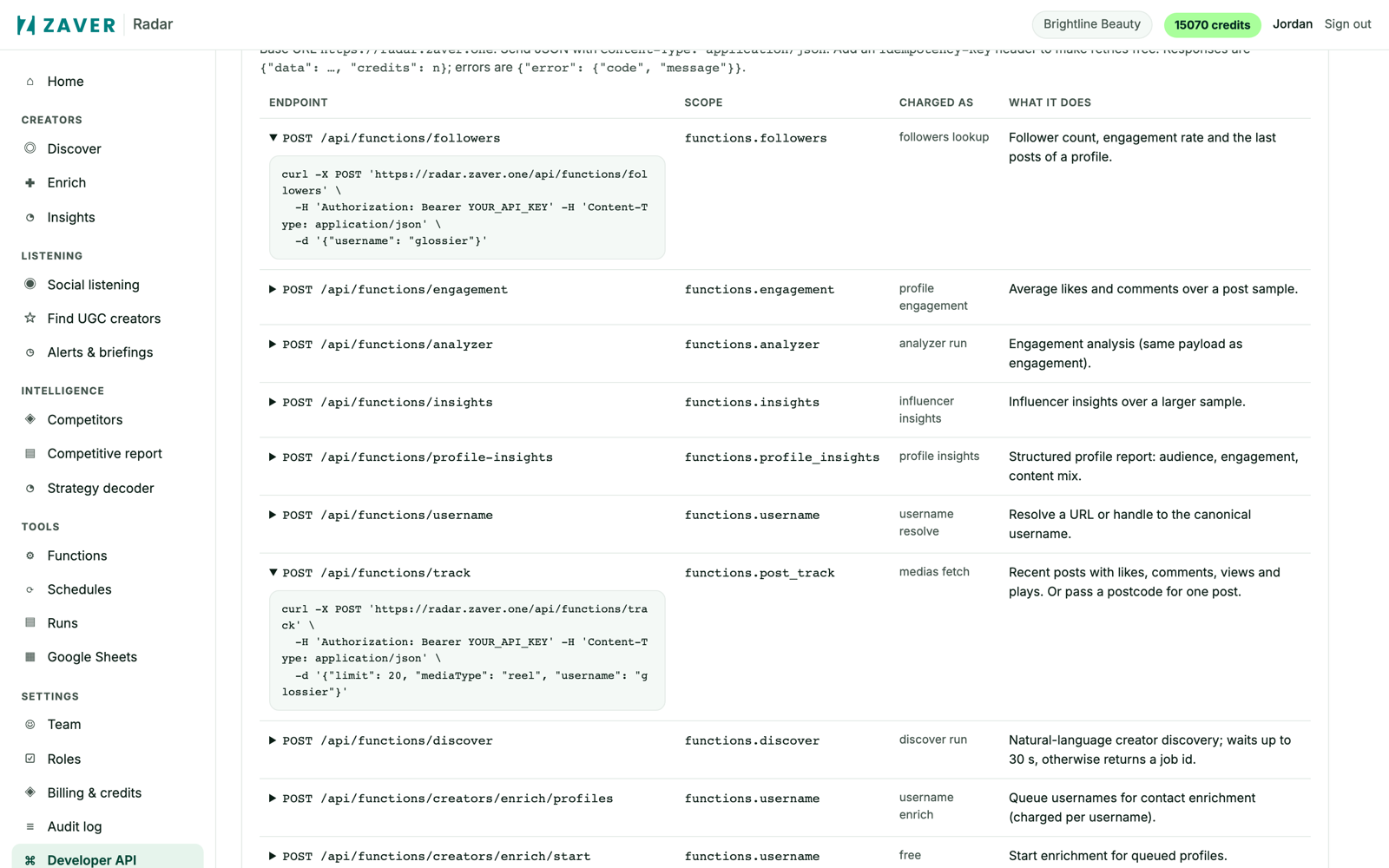
1 Settings → Developer: create a key, pick scopes, copy the docs.
What you get
Input: POST /api/functions/profile-insights · {"username":"glow***na"}
| Field | Example |
|---|---|
| healthScore · authenticityScore | 87 · 95 |
| er · avgViews | 6.2 · 38,400 |
| pricing | { low: 900, center: 1000, high: 1100 } |
| ageSplit · genderSplit · countrySplit | 25–34 dominant · 74% women · 68% US |
| detectedBrandPartnerships | [ { brand, postUrl, when } … ] |
profile-insights returns the full report in one POST; insights returns numbers only; analyzer returns the AI part.
Illustrative sample. Handles are masked; numbers show the shape of a real result, not a specific account.
Cost
Per call at your plan's developer rates, the same credits as the app. Reports reused free for 7 days.
Limits
- Rate and daily caps per plan; higher on Scale
- 10 handles per enrich call
- discover returns a job id when it takes longer than 30 s
Questions
Can I use it from Zapier or Make?
Yes. Plain HTTPS with a bearer key; no SDK needed.
Is there pagination?
track supports limit and maxPages; discover returns a job id to poll when it takes longer than 30 seconds.
Where are the docs?
Settings → Developer in Radar has every endpoint with examples and response shapes.
Related playbooks
Run any data tool on a schedule and get the file emailedUse the built-in Zaver prompts in Claude and ChatGPTCheck a creator's audience before you commitDeveloper APIAll playbooks