Playbook · Google Sheets · 2 min
Export an account's recent posts to Google Sheets
Quick content audits and pre-pitch research.
Extensions → Zaver.one → Fetch Instagram Posts. Enter the username and how many posts, up to 12. A tab named after the username appears with URL, Caption, Last Updated, Type, Likes, Comments, Plays and Views. For more than 12, the Developer API track endpoint pages through the account's history.
You need
- The add-on connected
- A username
Step by step in Zaver
- 1
Open Fetch Instagram Posts
Enter the username and the number of posts (1 to 12).
- 2
Read the tab
An existing tab with the same name is replaced, so re-running refreshes it.
- 3
Go further
Feed the URLs into Reel transcripts for a brand-safety pass, or into Post Analytics on another tab.
Where it is in Google Sheets
The menu path, step by step. Labels match the Zaver.one add-on.
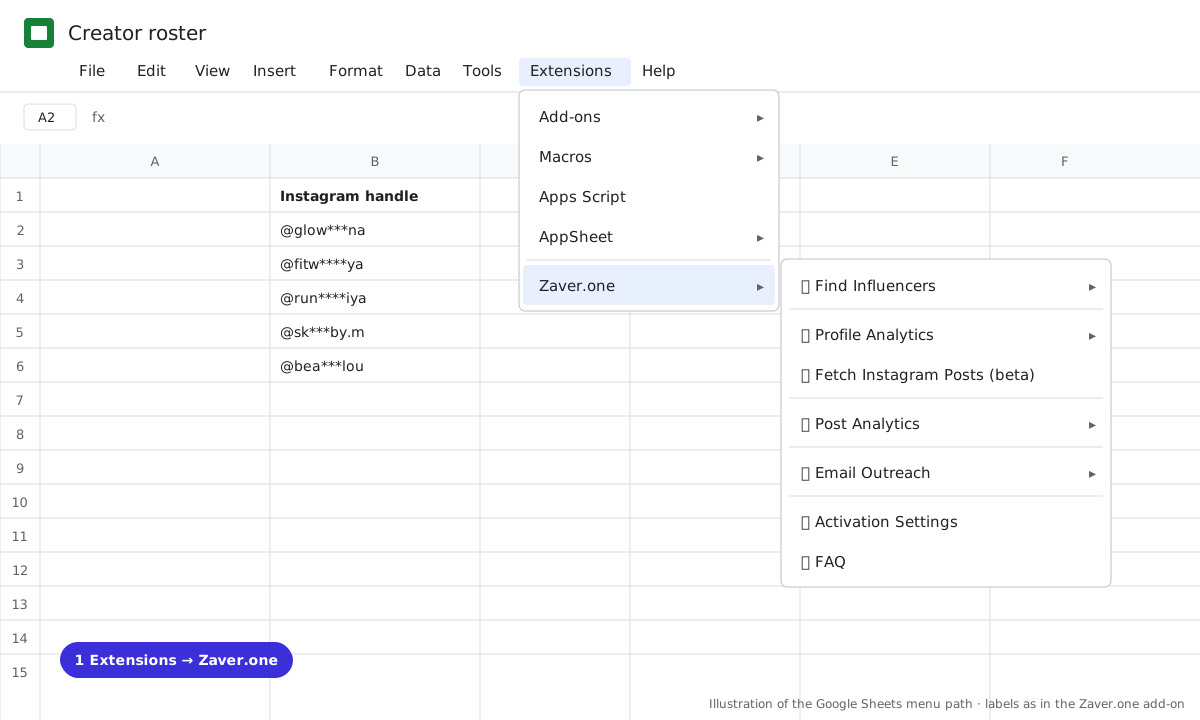
1 Extensions → Zaver.one. Every action starts here.
What you get
Input: @glow***na · 12 posts
| URL | Type | Likes | Comments | Views | Caption |
|---|---|---|---|---|---|
| instagram.com/reel/… | reel | 9.8K | 640 | 112K | "the SPF that doesn't pill…" |
| instagram.com/p/… | carousel | 3.1K | 122 | "my 5-step evening routine…" |
Illustrative sample. Handles are masked; numbers show the shape of a real result, not a specific account.
Limits
- 12 posts per run (beta)
Questions
More than 12?
Use the Developer API track endpoint with pagination, or the web app.
Related playbooks
Screen creator videos for brand safetyTrack Instagram reel views in Google SheetsGoogle Sheets add-onAll playbooks